






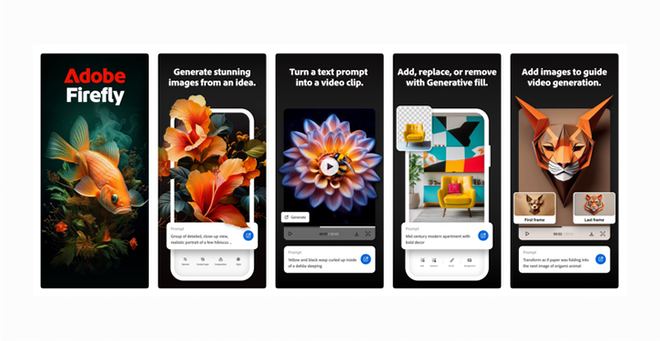
Adobe Firefly Mobile App Offers AI Image and Video Generation: Now Available on Android and iOS
Big news for creators, designers, and even casual social media users—Adobe has launched the Firefly mobile app for both iOS and Android, and it’s making AI-powered creativity available right from your smartphone. Yes, that’s right. No need for a high-end laptop or Adobe Creative Cloud subscription to get started anymore.
With this move, Adobe Firefly mobile app offers AI image and video generation tools, giving users the power to create visuals, animations, and creative assets in just a few taps. Whether you’re a graphic designer or just someone who loves making Insta reels, this app is something you’ll want to try out.
Let’s take a deeper look into the app’s features, how to download, supported devices, and what makes Adobe’s offering stand out in a crowded AI space.
Adobe Brings AI-Image Generation App to Phones: A Game Changer?
Earlier, tools like Adobe Firefly were accessible only via desktops or through web-based Creative Cloud accounts. Now, with Adobe bringing AI-image generation app to phones, they are opening up a completely new audience—mobile-first users.
In India and globally, many users access the internet primarily through smartphones. By launching a dedicated Firefly app for Android and iOS, Adobe is making sure no one is left behind in the AI creative revolution.
It’s not just about converting text to image anymore. Adobe has gone a step further by adding AI video generation, smart editing tools, animated text, and more—all inside one mobile app.
Adobe Firefly App: How to Download and Get Started
Getting the Firefly app is super easy. Whether you’re on Android or iPhone, just follow these steps:
On Android:
- Open Google Play Store
- Search for “Adobe Firefly“
- Tap Install
- Sign in using your Adobe account or create one for free
On iOS:
- Go to the App Store
- Search “Adobe Firefly“
- Tap Get
- Log in with Adobe ID
You can start using the app for free, though certain premium features may need a Creative Cloud subscription or credit system depending on your usage.
Adobe Firefly Is Now on iOS and Android: Here’s Everything You Can Do
So, what can you actually do with the Adobe Firefly mobile app? Let’s explore the main features that make this AI-powered tool exciting:
1. Text-to-Image AI
Simply type in a prompt like “a mountain village during sunset in watercolor style” and watch Firefly generate stunning visuals in seconds. You can customize:
- Art styles (sketch, painting, 3D, vector)
- Colors and lighting
- Composition and perspective
2. AI Video Generation (Beta)
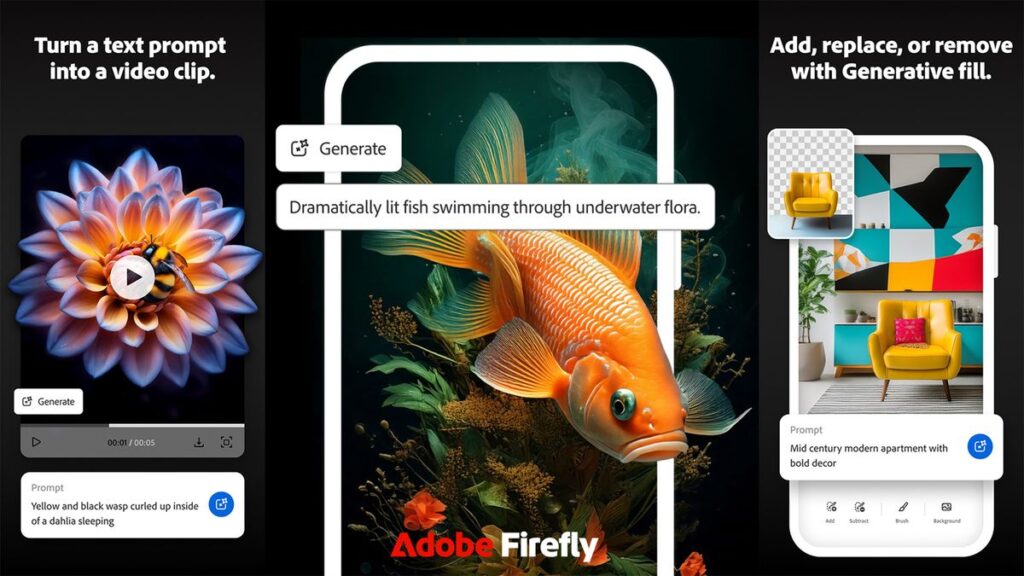
This is one of the most unique features—the ability to generate short AI-based video clips from text prompts or static images. Though still in beta, it shows great potential for creating:
- Social media reels
- Brand motion graphics
- Animated visual stories
3. Editable Templates & Instant Design Tools
You can select from hundreds of templates for:
- Posters
- Instagram stories
- YouTube thumbnails
- Product packaging mockups
All templates are editable with AI assistance, allowing you to replace images, auto-suggest color palettes, and generate copy suggestions.
4. Generative Fill & Remove Backgrounds
A super useful feature where you can:
- Remove unwanted objects from photos
- Extend image backgrounds intelligently
- Fill empty spaces with matching content (just like Photoshop’s Generative Fill but mobile-optimized)
5. Animate Text with AI
Add animated typography to your videos with just one tap. Choose from cinematic, playful, or minimal effects. Perfect for reels, intros, or advertisements.
Adobe Launches Mobile Firefly App with Expanded AI Model Options
With this release, Adobe has also updated its AI models under the Firefly engine. Users now get access to:
- Firefly Model 3 for improved image clarity, realism, and control
- Text Style Transfer AI (to match fonts with mood)
- Sketch to Image Generator (coming soon)
These models are integrated seamlessly into the app, giving you professional-grade results in a matter of seconds.
Also, unlike many AI tools, Adobe Firefly is trained on licensed, safe, and ethically sourced content, so there’s lesser risk of copyright or AI bias issues. A big plus for commercial creators!
Adobe Adds Partners for Firefly Integration
Adobe is not stopping at just launching an app. In this latest update, Adobe has announced strategic partnerships with major brands and platforms to integrate Firefly’s AI tools.
Some of the key collaborations include:
- Meta (Instagram) – to allow Firefly-based tools for content creation inside the Instagram app.
- Canva – Firefly AI tools may soon integrate for professional templates.
- Express App Users – If you use Adobe Express, Firefly tools are now available directly within that app too.
This shows Adobe’s intent to spread Firefly across ecosystems, not just limit it to Creative Cloud users.
Why Adobe’s Firefly Launch on Mobile Is Bigger Than It Looks
While many will see this as just another AI tool, here’s something to think about:
Adobe Firefly is quietly democratizing design for non-designers.
Earlier, you needed design skills, Photoshop knowledge, and a powerful PC to create a poster, remove backgrounds, or generate brand creatives. Now, a college student, small business owner, or Instagram creator sitting anywhere in India or the world can do all of this on a smartphone.
It’s not just a technical launch. It’s a shift in power—where creativity becomes accessible to everyone.
Also, Adobe’s clear focus on ethical AI, model transparency, and creator compensation puts it far ahead of most AI startups that don’t address these concerns.
Firefly Mobile App: Features at a Glance
| Feature | Details |
|---|---|
| Platforms | Android & iOS |
| Key Tools | Text-to-image, AI video, generative fill |
| AI Model | Firefly Model 3 (updated) |
| App Type | Standalone, free with optional premium |
| Integrations | Adobe Express, Meta, Canva (coming soon) |
| Supported Languages | English, Hindi (soon), and more |
| File Types Exported | JPG, PNG, MP4, GIF |
Pros and Cons of Adobe Firefly Mobile App
Pros:
- Intuitive and user-friendly interface
- High-quality image and video outputs
- Ethical and legally safe AI content
- Works on most mid-range phones
- Creative templates and easy downloads
Cons:
- Some advanced tools behind paywall
- Video generation still in early beta
- Needs internet to function fully
Absolutely! If you’re a content creator, student, freelancer, or even a curious experimenter, the Adobe Firefly mobile app offers AI image and video generation tools that are powerful, flexible, and most importantly – easy to use.
Whether you want to create YouTube thumbnails, promo graphics, AI art, or simply play with concepts, Firefly delivers pro-level tools without needing a designer’s skillset.
Adobe’s move from desktop to mobile shows they understand the future of creativity—mobile-first, AI-powered, and accessible to all.



One thought on “Adobe Firefly Mobile App Now on iOS and Android with AI Tools”
Comments are closed.